It is clear that several people are having problems with outgoing email with Mozilla’s Thunderbird. Most outgoing e-mail problems are related to improper SMTP (Simple Mail Transport Protocol) configurations. Sometimes an ISP’s server configuration changes. Sometimes the user may not select the proper SMTP server for an account. In this post I will attempt to cover some of the most common configurations that I find in the hope that one of them will work properly with your particular mail server or ISP (Internet Service Provider).
The first part of this article begins with the post Outgoing Email Problems with Thunderbird. You might want to check that out for some background information.
I will start with some of the common SMTP configurations that I see. If you use a major ISP and your configuration is different, please post the name of your ISP and the configuration details in the comment section. Also, if you know of a publicly accessible page where the ISP offers configuration information, please post that as well.
Lets get started.
First, the Thunderbird configuration section for SMTP server settings can be found at:
- Select Account Settings from the Tools menu.
- Scroll down to the bottom of the list if e-mail accounts.
- Select Outgoing Server (SMTP).
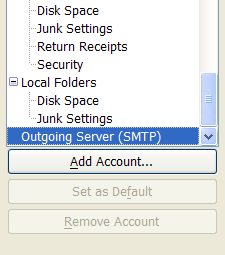
The section that you want is at the top of the right-hand side.
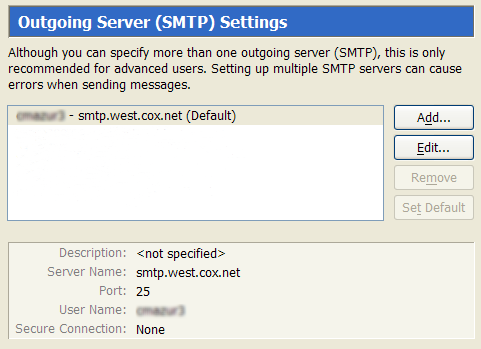
Highlight an SMTP account and click the Edit button, or if you want to add a new account click the Add button. The SMTP Server dialog box will pop up.
The Description is not important, but if you configure multiple SMTP accounts it would be a good idea to enter a description. The Server Name and the User Name are the two important areas to focus on. You will need to get this information from your hosting company or ISP. The account name is usually just the primary account name from your ISP. That is the name to the left of the @ in your primary e-mail address. With some ISPs it is important to use the primary account name and not necessarily the account name for the individual e-mail address you are using.
You do not need to set up separate SMTP accounts for each e-mail address if you have multiple e-mail accounts set up with the ISP. In fact, most ISPs allow you to run all of your outgoing e-mail through their SMTP servers, so if you find that one SMTP server works well, try selecting it for each of your e-mail accounts.
Typical AT&T SMTP Configuration in Thunderbird
- Enter the SMTP Server Name. There are many variations of this, depending upon which AT&T e-mail service you are using. You will need to get the correct server name from your AT&T service provider.
- Make sure that “Use name and password” is checked.
- Use the full e-mail address for the primary account.
- AT&T e-mail uses a secure connection. Click on the SSL radio button. The Port will change to 465 when you click the radio button.
AT&T Support Info: How to verify At&T email Settings.
Typical Cox.net SMTP Configuration in Thunderbird
- Enter the SMTP Server Name. Cox uses different SMTP servers for different geographic regions in the USA. Get the proper SMTP server name by contacting Cox.
- Make sure that “Use name and password” is checked.
- Use the account name for the primary account. Thunderbird will prompt you for the password the first time you send e-mail.
- Cox does not use a secure connection. Leave the No radio button selected.
Typical GMail SMTP Configuration in Thunderbird
- Enter the GMail SMTP Server Name.
- Make sure that “Use name and password” is checked.
- Enter your account name. If the e-mail address is myaccountname@gmail.com, the account name is myaccountname. Thunderbird will prompt you for the password the first time you send e-mail.
- GMail uses an encrypted connection. Make sure that the SSL radio button is selected.
A Very Important Final Step
Do not forget that if you set up an additional SMTP server configuration, you must select it in the Account Settings for each e-mail account you want to run through that server. Right click on an account name and select properties to view the Account Settings. You may also have to clear the password assigned to an account when you switsh SMTP servers. Follow the instructions in changing Thunderbird passwords to do so.
Some Additional Notes
- Always get the proper outgoing email configuration information from your hosting company or ISP.
- Don’t rule out the possibility that your PC might be causing the problem. Try temporarily disabling your virus software and firewall to see if either of these systems is blocking outgoing e-mail.
- If possible, set up multiple SMTP configurations so that if one fails, you can switch to another. I run most of my mail through my Cox SMTP server because I have found it to be more reliable than AT&T. However, both accounts have gone down periodically. Mail servers run into problems just like any other server. Sometimes the customer service people that you call are completely unaware of any issues with server downtime.
- If you are using a Yahoo account for e-mail, be aware that Yahoo changed their system configuration a while ago. See the following page for more information: Yahoo Outgoing E-mail Problems with Thunderbird.
Dr. Anton Fnatt says
I DON’T UNDERSTAND ANYTHING.
I have been ‘on air’ for over 10 years and have taken care of my favourite email accounts from the beginning of dawn.
Every now and then I reformat my PC and reinstall my favourite email program - Mozilla Thunderbird - with say - 14 email accounts. An absolute multiple account setup? Not many months ago I started to get trouble, emails from all accounts went out fine however the FROM address seemed arbitrary. I don’t understand why while sending from the SAME account but to different receivers, my FROM address changes between the email address that I sends from while other emails (to other friends) are sent with the email address to the default SMTP address that is common for all my 14 email addresses. This is really annoying because I cannot respond an email and believe it is returned to the same address as it was sent to. This process is completely consistant, one specific incoming email will always use the same outgoing address - but I have no control of what email address. It shall not be like this.
TE says
Hi Doc
I don’t usually post rants, and this does fall into that category. I get plenty of rants from people frustrated with software problems. Trying to solve many of these problems is similar to the blind men describing an elephant, because the software doesn’t give you a clue as to the root of the problem. That means that we have to resort to a method that I call, ‘poke and hope troubleshooting’.
If I understand your problem correctly, Thunderbird is randomly changing your reply-to address on your outgoing e-mails. Make sure that you specify a reply-to address for each account in the Account Settings. For some reason, Thunderbird does not fill this in when you set up a new e-mail account.
I don’t know why you might see an arbitrary e-mail address in the reply-to, but specifying an address may fix the problem.
Let us know if this works.
george says
thanks
this worked for me
Frank says
The Edit/Accounts setup page allows entering multiple SMTP’s.
My problem is that I have no idea how to control which one is used! Making the second one in the list the default one is of no use, since T’bird continues to use the first one in the list. Only by deleting all but one can I force use of that one.
TE says
Hi Frank
Setting the order of the SMTP servers with Thunderbird doesn’t do anything. You should be able to select the SMTP server assigned to each e-mail account on the Account Settings page for each e-mail address. The selection is Outgoing Server. Make sure that you click OK to save your selection.
Brian says
I was having the same issue with not being able to send e-mail. I have 2 accounts, both of which get used regularly for different things. What solved it for me (using AT&T Yahoo) was to set up the outgoing (SMTP) server settings for each account separately, even though they are using the same server. Once I did that, it worked fine. Hopefully, it will continue to do so! Happy holidays!
Ken says
TE, I use Thunderbird for my business account, now it has worked fine until I switched to AT&T. I have talked to my webhosting agent and he said that everything is configured correctly with them but when I told them I was using AT&T, they said that they were probably the problem. Now I recieve emails no problem, but I can not send them. I have contacted AT&T and they told me that they don’t know what I am talking about. Below are me configurations. Please help!
Description: NSG Account
Server Name: mail.navystudyguide.net
Port: 25 (I have tried port 465 as well)
Security and Authentication
User Name: billing+navystudyguide.net
No SSL and I have tried with SSL which switches to port 25
TE says
Hi Ken
You are not using AT&T for your outgoing e-mail. This configuration has nothing to do with AT&T. If you want to use AT&T accounts, you have to run them through the AT&T mail server. Try using the AT&T configuration shown above.
For e-mail accounts related to your web site, you have to determine which configuration works best with your mail server. That information should be supplied by your hosting company. You may have confused the hosting tech when you mentioned AT&T and he assumed that you were running outgoing e-mail for your web site through AT&T. The AT&T tech was probably also confused because the configuration has nothing to to with AT&T.
If you are trying to run your web site e-mail through the AT&T SMTP server, you have to set it up using an AT&T account. In other words, set up the SMTP configuration for AT&T and then select that SMTP server in Thunderbird. Do not use the username and password for your web site account because the AT&T server will not recognize it.
Generally speaking, you can run your e-mail through any outgoing SMTP server where you have an account, but some ISPs do not let you run e-mail from other ISPs and e-mail accounts through their servers.
Sunvolt says
My Tbird receives, but will not send email. I recently uploaded Tbird because my bootleg version of Outlook 2003 would no longer update. My web host and email server is Godaddy. I set up the account with online support from Godaddy. All outgoing email sent at first, but then I found I had to resend in order for it to transfer. Then, something shut off my Virus Protection. I was using AVG. It was no longer operating. I tried AVG uninstall to no avail. I was able to upload Avast!, so now I had Virus Protection but still could not uninstall AVG, and in addition, I could no longer send email. I have rechecked my “Account Settings” for Tbird and they seem to be set correctly. Is there a glitch with AVG/Avast!? What do you think?
Sunvolt
Doogie says
Hi Sunvolt
It is difficult to determine the nature of the problem given the limited information Thunderbird provides when there is a problem. Other software can create problems that are not obvious.
If you suspect AVG is the problem and need to fully uninstall it, try some of the tips I found on the following web page:
http://www.pchell.com/virus/uninstallavg.shtml
Antivirus software can sometimes be very difficult to remove. If you think Avast is causing the problem, try temporarioly disabling it and then test Thunberbird outgoing e-mail.
Cindy says
I’m new to At&t dsl service and am on a mac using Thunderbird. I. like many others can not send e-mails. It keeps ask for my password but keeps rejecting it. I’ve tried everything I have seen suggested. I haven’t seen any comments about AT&T-Thunderbird-Mac. I’ve been working on this problem all day.
Hope you can help! Thanks!
Doogie says
Hi Cindy
That does not necessarily mean that the password is wrong. It is getting rejected by the mail server because some part of the connection is not correct. For most AT&T email services you must check SSL because AT&T requires a secure connection. Also, make sure that the server name is correct. If you cannot connect, call AT&T for support.
Joey says
I use Thunderbird at work, at a college, and they recently switched our email over to a new server (IMAP). I can pull my mail off of the server with no problem, but I can’t send email. I thought I had the settings correct, per what IT told me the changes were, but I still get this: “An error occured sending mail. The mail server sent an incorrect greeting. *OK CommuniGate Pro IMAP Server 5.2.14 at ****.edu ready.”
The server for both in and out going mail is mail.****.edu, port 143, with no ssl.
Am I doing something wrong? How do I fix this?
Doogie says
Hi Joey
Something has changed with the SMTP server settings. SMTP is for outgoing (sending) messages. POP and IMAP are for incoming (receiving) messages. It looks like you are trying to send messages through an IMAP server. It would be unusual for both the incoming and outgoing mail servers to be named the same. Check with your IT person again. The SMTP settings are wrong.
Asbjorn Nesse says
Hi,
I work very often with my laptop in different but well known networks. Meaning I have all actual SMTP adresses. But, the way it is done know my going through the meny and set as default is not a very easy way. I’m looking for a button in the menu with text telling me which SMTP is set and a click on that button I can make the change.
Is that easy to do and how??
Best regards
Asbjorn Nesse
Norway
Doogie says
Hi Asbjorn
You can select an SMTP server from the list of SMTP servers you have set up in Thunderbird, but you have to do it on the Account Settings page. Just right-click on any account in the left-hand window in Thunderbird. That brings up the Account Settings display for that account. There is a drop-down list on the right side named “Outgoing Server (SMTP)” where you can then change the SMTP server assigned to that account.
If you have not already done so, you can set up as many SMTP servers as you wish on any Account Settings page. The Outgoing Server setup is the last selection on the list of accounts.
Frank says
I’m having trouble with the compose feature of Thunderbird. I have five email accounts all with individual outgoing server settings and one-to-one identities. Recently, I have discovered that every time I go to compose a new email, another duplicate set of identities is listed in the “From” pull-dwon menu. There are now so many duplicate identities (and even cross-identities that I never established) that I can’t reach one of the From domains that I’m using quick frequently now.
Has anyone ever run into something like this? Any ideas (short of a full reinstall?)
Thanks, Frank
Tom says
I have an SMTP issue that is driving me batty. I have just downloaded Thunderbird to a work computer on which I’ve been using Outlook. I have entered, re-entered the SMTP name and user name and even copied and pasted from my Outlook settings, but no luck. The server always rejects the send request. Any thoughts?
Doogie says
Hi Tom
It can be frustrating to resolve these issues. There are so many interactions involved with an e-mail connection that it is hard to identify the root of a problem. Plus, it doesn’t help when software only offers generic error messages that do not tell you anything that you do not already know.
Experiment with the settings, such as SSL. Restart Thunderbird after each configuration change.
Make sure that you have the correct Outgoing Server selected on the Account Settings screen.
Try calling tech support at your ISP.
It is also possible that a firewall or security software on your PC is causing the problem by blocking the Thunderbird connection. We have seen intermittent problems with Norton Anti-Virus blocking Thunderbird connections. This appears to happen just after Norton does an automatic virus definitions update. Re-booting the PC re-starts Norton and usually resolves the issue.
This information needs to be updated for version 2.0.0.23 (20090812). The structure of the Outgoing Server configuration changed a couple of versions ago. I have an incorrect setting and although I’ve been using Thunderbird for years and am probably considered an Advanced User, I cannot figure out how to edit this error.
Doogie says
Hi Ritergal
What changed? What error? What incorrect setting?
I’ve been using Thunderbird for several years and I have not seen a change in the SMTP server settings. Perhaps something changed on your PC or with your hosting company. Some hosting companies are blocking the use of their SMTP servers unless the e-mail is coming from one of their e-mail accounts. Some anti-virus programs can also create problems.
Susan says
cannot send Thunderbird emails…receiving okay… settings are correct…it occurs to me maybe it could be AVG..( I have that) can I temporarily disable it, try it , or put exception in the firewall, setting and if ok what do I put ( I have ATT) thanks.
Doogie says
Hi Susan
You can temporarily disable AVG if you follow these instructions. Just don’t try to download any e-mails until after you re-enable AVG. You don’t want your PC to catch a bug.
With AT&T, make sure that you have an AT&T SMTP server configured in Thunderbird with SSL enabled. AT&T will not work without SSL.
Hi there!
I was struggling with figuring out how to change my outgoing smtp, as I’ve moved across to a 3G modem from ADSL for the foreseeable future. With multiple email accounts there is only the one to change all, right at the bottom……boy, I could not find it, but after Googling “changing outgoing server thunderbird” I came across this gem. Thank you guys, for making life easy for technologically challenged people like myself!
Keep well & take care!
Jacques Snyman
Frank Haywood says
Hi there,
This isn’t a rant, more of an observation. Every 12 months or so, I try out Thunderbird again to compare it with Outlook Express / Windows Mail, and it never comes close to ease of use, in fact OE is probably the best pure email client I’ve ever used. WM has some weird timeout bug with IMAP where if there’s a file attachment of more than a few hundred kb, it just hangs, so OE is still my favourite.
I have about 50 email addresses scattered over almost as many domains, and I use IMAP for all of them so that I can keep multiple PCs synchronised with the same email. Setting them up in OE is simplicity itself, and I now use the export/import function whenever I re-install or build a new PC.
The trial of TB I did today was because I was testing out PortableApps.com on a flash drive, and TB comes as part of the application suite.
Again I hit the same problems as I’ve always done with TB. Clunky interface that looks like it was designed in the 80s, illogical way of setting up email accounts, incorrect assumptions made such as I only want to use one SMTP account for all my email, etc, and today a new one. Some of my email which displays itself correctly in OE and WM doesn’t appear to have a date, notably emails received from Google AdWords.
You know what? I would dearly love to use a mail client other than OE or WM, and I’d like it to be TB, but it seems that it’s never to be. I know a lot of people love TB, but I’ve never been able to see why. You’d think that as FireFox is so much better than IE, that TB would be be a lot better than OE, and it’s an annoyance that it isn’t.
Thanks anyway for posting these helpful tips, but I fear TB has some fundamental design problems that need addressing before it can become as mainstream as FF.
-Frank Haywood
norman says
With all these onging issues over the years - I’m surprised that no one just came right out and said it: ATT/Yahoo censors your email and requires that the FROM name used on your email macth the same account name used on the SMTP server. Meaning - if you want to use different FROM addresses especially with other domains as your email address - you can’t!
If the “FROM” address isn’t an ATT/YAHOO address, Yahoo won’t allow mail to be sent. This is an unfixable problem for people that want to use a separate “from” address on their emails and the main reason that ATT-YAHOO stinks! I’m switching back to COMCAST first thing who didn’t have this censorship issue forcing people to only give out and use their assigned user name as the only FROM email address allowed by Yahoo/ATT. The TO: FROM: SUBJECT: fields of a personal email should never be censored or limited like this and aren’t with a real ISP. ATT/Yahoo is a joke and lame excuse for an ISP! I like many people have multiple addresses across different domain names and prefer to send some emails using disposal FROM addresses that I dont mine getting SPAM depending on what they are and NEVER give out my real email addresses I care about except for special uses. Again, ATT/Yahoo always forces you to only use your registered address for everything by checking if the FROM used in your email program matches the account on the SMTP server. Simply ridiculous Yahoo B.S. I’m sure - worse than all the complaints about Microsoft’s monopolistic marketing practices. You pay ATT to be your ISP and then Yahoo censors your mail as if it belongs to Yahoo who I never wanted in the first place!
Pat says
I’m having trouble sending email. All I see is the “Send Later” designation. Don’t know what I did to change it to that. The “Send” designation will not allow me to highlight it. Please help.
Doogie says
Hi Pat
I have never seen that message, but perhaps someone else has. It sounds like the mail server is replying with a busy signal.
Alan says
When I select a default outgoing SMTP server in Thunderbird, outgoing mail does not default to it when I write new mail. The list of servers shows up in the order they appear in the Account Configuration window, and I have to select the “default” server manually. Shouldn’t it appear at the top of the list and be the automatic choice when I create new mail?
Elvis says
My father and I both use cox as our isp. For some reason I can send/receive without a problem on different wifi connections. My father can only receive and not send, when on a connection other then a cox connection. I’ve compared his mail settings to mine and they are exactly the same. We are using smtp.west.cox.net:25 with username/password box checked. He was using IncrediMail, I thought that might be the problem so I had him switch to thunderbird 3.0.4, but he still can only receive and not send. His problem needs to be resolved as we are both going to be on the road as professional truck drivers. He needs to be able to send mail. I know worst case, he will have to use cox’s webmail to send. Thanks, for your time.
Pat says
I had the same problem with my outging smtp.
After reading your tutorial I finally got it to work. The only thing I can figure I was doing wrong even after I talked to the useless customer service@att-u-verse I put ATT in where it says description instead of the e-mail account that I was told to put there by ATT Customer Screw Around.
Chris says
When I send mail TB choses to send from the first account on my list. How can I change my default mail sending account to be one of the other mail accounts I have. Thank you
Oh and additionally, I could not figure out for TB to check mail automatically, although I have selected “check for new messages every …” How can I fix this please
Doogie says
Hi Chris
You are not sending mail correctly. If you simply choose the Write button on the toolbar, TB will use your default e-mail account.
You should have individual e-mail accounts set up in Thunderbird for each e-mail address. Click on an account to select it and then click on the Write button or the Write a New message link. The e-mail is always sent from the account that you choose.
Unless you change the setting, Thunderbird checks for messages every ten minutes. Thunderbird will only check for messages when Thunderbird is opened. The timer starts running when TB is loaded.
Chris says
Doogie, I need to change my default e-mail account. How do I do that please?
Additionally I may have changed it without noticing, I could not find how to do that either.
Thank you
Doogie says
Hi Chris
To change the default e-mail account, go to Tools > Account Settings, then highlight the account that you want to be the new default and click the Set as Default button at the bottom of the account list.
Did my earlier advice resolve your other issues?
Chris says
Doogie, I may have misrepresented the issue, but this was the issue
and you solved it. That leaves me with the automatic checking of new messages issue.
If you can help me with that too, I will start feeling a little more dignified 🙂
Doogie says
Hi Chris
I really don’t know why the automatic downloads are not working. I don’t see any way to disable/enable that feature somewhere else in Thunderbird.
It is not a particularly good feature to use anyway. We were once locked out of our server because Thunderbird had a problem downloading messages and the firewall interpreted that as an attack and blocked our IP address. Since then, we have shut off the automatic message downloading feature.
Edward W Crane says
This is fine for when you are at home say, using your ISP but what happens when you take your computer on the road? Time-Warner (Roadrunner) tells me to use 587 as my SMTP outgoing port. Tried it and it didn’t work. So how do I find the right port when I’m in Maui?
Conrad says
Hi Edward
The port selection has nothing to do with your geographic location. It is related to the port that their mail server uses to accept e-mail.
Some ISPs change the port to avoid attacks on their servers, which is common when they use port 25.
Check with Roadrunner again. If port 587 is correct, then there is something else wrong with your SMTP configuration.
There is more to making a connection than just the post. Make name the username and password are correct and the security settings are correct.
sandy says
Two days ago my email started to have this issue. anyone emailing me to my shaw address is getting a notification sent back to them saying that it was undeliverable to my old hotmail address, haven’t used it in a year. Whats up? Otherwise I like the Thunderbird.
Any help or advise.
Doogie says
Hi Sandy
This has nothing to do with Thunderbird. Bouncebacks and messages like that come from a mailserver.
If you haven’t logged into Hotmail in over a year, you probably no longer have the Hotmail account.
Abraham says
hi problem solvers…. plz plz give me a solution for my stupid problem…. (prob with thunderbird out going emails) and no probs with incoming. (i did and checked with all issues and correction you did) actually this is what it says every time i send….
“An error occurred sending mail: The mail server senting incorrect greeting: +OK POP3 server ready
plz plz plz…. after sending solution. send me a notice to my mail id. ok dude…
Conrad says
Hi Abraham
It looks like you have your outbound e-mail pointed to a POP3 mailserver. It should be going to an SMTP server.
Catherine says
Success! I was having an impossible time finding SMTP settings in Thunderbird. You directed me right to it, and helped solved the problem in a flash. Thanks tremendously.
Ray Taurianen says
Lately when sending a mail we have been intermittantly getting an error message that the SMTP server could not be found. TB keeps trying to send the message, and will probably keep trying forever. We then have to save the mail to draft, and reopen it to maybe succesfully get it out. Most of the time the mail has an attachment, but not always. IPS says that our settings are correct.
Doogie says
Hi Ray
It is not easy to figure out the problem, but keep in mind that even when the settings are correct, if the SMTP server is busy, you may not be able to connect. If the SMTP server cannot be found, then either there is a problem with the server or with the DNS settings for the server. There isn’t anything that Thunderbird can do about either of those problems, but once you get the error message it should no longer be trying to make a connection.
I frequently run into problems with Cox’s mail servers. I just wait a few seconds and try again. I could call Cox’s tech support until the cows come home and they will always blame it on anything but their servers. However, the problem is their servers.
Brian John Mitchell says
My old computer died, but I was able to recover the majority of the data from the drive. I’m having problems getting Thunderbird to work (what my hosting company says are the settings gives me a really generic error when trying to set up the machine) & I was wondering if there’s a file I can open or copy over that will give me the info to set it all up?
Doogie says
Hi brian
Check out this article. If you have recovered your old Thunderbird files, you should be able to get it to work by pointing Thunderbird to the old files.
http://www.tech-evangelist.com/2006/01/04/mozilla-thunderbird-file-location/
trede says
Hi,
I have a problem with the sent-mail of my Thunderbird account AT HOME.
I recently transferred from Germany to the US and we installed an AT&T provider at home.
The laptop configurations on my laptop, which I brought from Germany, haven’t changed. THey work perfectly at the office (University of Michigan). But at home, I can only received and administer emails on my Thunderbird, the sending always fails.
Could you please let me know what the problem is?
May it be AT&T?
If so, how could that be changed?
Many thanks,
melanie trede
Doogie says
Hi Melanie
There isn’t enough info to identify the problem.
It sounds like you might have a firewall or antivirus software problem that is blocking your outgoing emails. If you can temporarily disable the firewall or antivirus software, see if you can then send e-mails. If you can, then you need to contact the software company to find out how to allow outgoing e-mail.
Make sure that you turn the firewall or antivirus software back on before you attempt to download messages.
You did not say whether you are using a high-speed or a dial up AT&T connection at home. The SMTP connections can be different depending upon which service you are trying to access.
John says
I have a similar problem I can’t find any info about. I want to set up Thunderbird to send from myname@mydomain.com, through my broadband provider’s server, but I don’t want to receive POP3 email from my domain as that is forwarded in catch-all fashion to a gmail account. In other words I want to be able to reply from Thunderbird from an email address at mydomain but not receive, as I am receiving through gmail. I can’t see any way to set up Thunderbird for this, as it doesn’t seem to want to let me set up an SMTP email account for outgoing mail only without a POP3 component. Is it possible? I used to be able to do it fine in Windows Mail.
Doogie says
Hi John
There is no POP3 choice for an SMTP server. SMTP only deals with outgoing e-mail. POP3 and IMAP are incoming e-mail configurations.
If I understand you correctly, you want to receive your e-mail through GMail, but send from another e-mail account. That is actually pretty easy to do in Thunderbird.
First, you need to configure Thunderbird to pull in your messages from GMail.
Next, you need to make sure that you have accounts set up in Thunderbird for each of the e-mail addresses that you wish to use for the Reply address.
When you reply to a message, a drop-down list appears in Thunderbird in the From box at the top of the screen where you can select any of the e-mail addresses that you want to show as your Reply address. Thunderbird will substitute the e-mail address that you select as the Reply address. You are not actually sending from the other account, but it appears like you are doing so.
If you do not see the drop-down, upgrade your version of Thunderbird.
ho2ninja says
How can i configure account settings so when i send bulk emails other recipient will not see other email i have sent the message to.
Then i want only the message to deliver to the recipient with sending other peoples emails. Thanks
Chris says
Hi,
I had setup my wife’s work email with Thunderbird years ago and never had any problems. Recently our home ISP switched email carriers over from mts.net to windows Live so she wasn’t able to send email any longer with the former configuration. In order to re-configure TB I had to change the SMTP account from smtp.mts.net to smtp.live.com, port 587, TLS, and had to enter my ISP username. That account can now send mail with Thunderbird again, but the problem is all emails I send appear as from “Chris and Trudy” and not the name@workemail account that I have setup in thunderbird. I have only one email account set up in TB - her work account. How can I get her emails to be “from” her email account instead of our home account which the ISP associates with.
Hope that’s clear enough… I can’t figure out why it’s doing this! Thanks for any help!
Doogie says
Hi ho2ninja
When sending an e-mail, the To selection next to the e-mail address is a drop-down. All that you need to do is to select BCC (blind copy) rather than using the default selection To.
If you are entering individual e-mails, you need to do this for each e-mail address. If you select a list, you only need to do it once for the list.
Doogie says
Hi Chris
There are three places where the account name “Chris and Trudy” could be coming from.
1) On the Account Settings page in Thunderbird for that e-mail account. That field is labelled “Your Name”.
2) It is possible that your ISP is adding it.
3) In the recipient’s email system. E-mail systems routinely capture that information and automatically set up address book accounts. Those address book accounts retain the account names from previous e-mails. Thunderbird does that, as well. If you are testing it with someone, have them take a look at the address book account in their system.
If you have already verified that it is not #1, the issue is probably #3.
Chris says
Hi - thanks for the reply. I already checked and it is not #1.
I also don’t believe it’s #3 (I thought of that initially) because I tried switching the smtp server to a second Windows Live account that we have and when I sent an email using that smtp server, the “from” reflected the change.
Hope I’m not being confusing.
First smtp server tried was:
smtp.live.com
username: ctszxx@mymts.net
This email account name in windows live is “Chris and Trudy”, and all emails I sent appeared to be FROM Chris and Trudy even though they were send in TB from my wife’s “name@workplace.ca” email account.
I changed the settings to a second Windows live username that I don’t really ever use but had set up before:
smtp.live.com
username: firstname.lastname@mymts.net
Now when I sent an email in TB from my wife’s work email it appeared as FROM firstname.lastname@mymts.net. I have never designated specific names to this account in Windows Live so it just appears as the actual email address. This email account isn’t entered into my address book - in fact I’ve never even used it before.
Is this a matter of Windows Live re-routing all outgoing mail through their server and automatically adding the name because it is attached to the smtp server and email account used for authentication?
I hope that makes sense and I wasn’t confusing. Thanks again for your help.
ho2ninja says
Doogie it works . Thanks alot
Doogie says
Hi Chris
If I understand you correctly, it looks like it is #2. You have to log into an account on an SMTP server in order to route mail through it. It looks like it is picking up the account name from there. I don’t think I have ever seen that happen, but you are dealing with a Microsoft SMTP server, so anything strange is possible.
There is the way that most things are done on the Internet, and then there is the way that Microsoft does it. Microsoft is always trying to set new standards on the web, but almost no one pays attention to them because they have little influence on the ways that things are done on the web.
William Singleton says
I recently upgraded to Thunderbird 11. Now when I send an email I get an error message that it didn’t send but it actually did get to the recipient’s inbox. It doesn’t put a copy in the sent folder either. When I click out it asks if I want to save it.
It’s pretty aggravating even though the messages go where they’re supposed to go. Does anyone have a fix?
Doogie says
Hi William
I have not seen that problem, but it appears that something did work correctly with the upgrade. Thunderbird 12 is available. Try upgrading to that. I have not had any problems with Thunderbird 12.
musicmamo says
we have verizon as our ip. we have three different emails, one using outlook, one using eudora and the main one using thunderbird. all three receive mail. outlook and eudora can send, but thunderbird will not. i have noticed on the sites that show you screenshots that my window is not the same. there is no box to check for “use name and password. os is windows xp, running thunderbird 14. help, anyone?