Thunderbird is a very powerful free e-mail client found at Mozilla.org. You will find it to be very easy to use, but not always intuitive. One of the questions I’ve been asked several times is with respect to setting up mailing lists in Thunderbird. This is actually very easy to do.
Mailing lists can be very handy for mailing messages to any group of people, whether it be a group of friends, family members or a number of people at the same company.
To set up a mailing list, follow these simple instructions.
- Open Mozilla Thunderbird.
- Under the Tools menu at the top, click on Address Book.
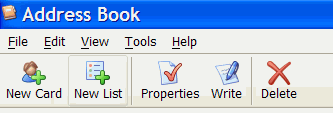
- When the Address Book opens, click the New List button near the top. The Mailing List window will open.
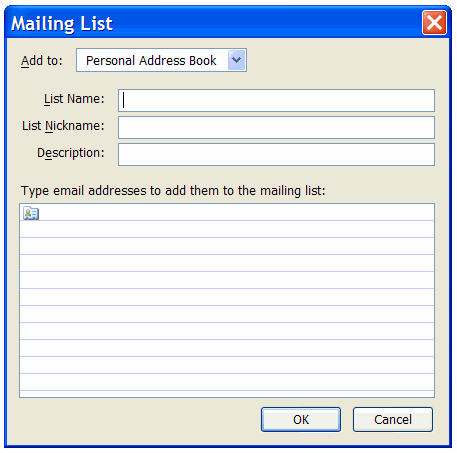
- Enter a name for your list next to List Name.
- Enter the e-mail addresses for your list in the box below. Enter one address per line.
- When you are done, click OK to save your list.
Your mailing list will appear in your address book along with your other e-mail contacts. A mailing list is selected in the same manner as any other entry in your address book.
When you select a mailing list to send a message to, only the name of the mailing list will appear in the To window in your Thunderbird screen, but keep in mind that anyone receiving the message will see the entire list. If you do not want recipients to see the list, you can select your own e-mail address as the To recipient and select Bcc (blind carbon copy) from the drop-down list on the next recipient line. Type in the first few letters of the name you used for your mailing list and Thunderbird will insert that name in the Bcc field.
To select a mailing list for editing, simply open the Address Book, right-click on the name of the mailing list and select Properties. Pretty simple stuff. 😀
Is there a way to create a mailing list by copying and pasting more than one email at a time? several hundred names at once?
TE says
That is exactly what the mailing list feature is there for, but I have never tested it to see if there is a limit to the number of e-mails that you can insert. Several hundred sounds like spam. 😀
Name your new list per the above and click OK. Then you can drag into your new list from other Thunderbird files the email addresses you want, including several at a time.
I have a very long email list of my club members (400 +) who wish to receive regular emails. I have a lot of trouble with Thunderbird. It does not seem to allow sending of so many emails at once. Also if even one email address has the slightest irregularity it will refuse to send to any recipients and will give an “incorrectly formatted email address” error message. Unfortunately it does not identify the address in question. This is a huge problem and very hard to trouble shoot and fix.
Any suggestions on how to remedy these problems?
TE says
Hi Miki
I have not been able to find any information about a limit imposed by Thunderbird for the number of e-mail addresses that you can use in a mailing list. However, there is very likely a limit that is imposed to prevent its use by spammers. Although your list is legitimate, you can’t explain that to a software program.
I used to use Eudora and the limit with that was 10. If you tried to send a message to more than 10 e-mail addresses, none of them would go out and there were no error messages indicating that they did not go out.
There is another issue that you may be dealing with. Hosting companies have been installing systems that limit the number of e-mails an account can send within an hour. This is a serious issue with hosting companies because e-mail spammers set up an account and send out millions of spam messages, which typically gets the hosting companies IP addresses added to spam block lists. Check with your hosting company to see if they are imposing an hourly limit.
You might want to experiment with multiple lists with smaller numbers of e-mail addresses in each. I don’t see a way to prevent the problem with invalid e-mail addresses. You will need to review those. Watch for commas used in place of periods. Commas are used to separate e-mails in a list and will probably break any e-mail list when they are used in an e-mail address.
Your best solution might be to look for one of the hundreds of mailing list manager systems that are available. Some of these are installed on your PC, while others are web based.
Can anyone, then, recommend a really simple email mass mail program
to use with Thunderbird and the Mac, for handling a list of about
600 - 800 email contacts?
I’m new to Thunderbird, and like the correspondent above, having a difficult time with mailing lists. I can’t drag more than one address at a time over, and I’ve got hundreds of them (all of whom have given permission to be on my mailing list, so it’s not spam). It was very simple in Netscape Mail, just drag and drop the names into the list.
I’m also having a difficult time with blind carbon copy. I’m bound by privacy legislation to not disclose the recipients email addresses to others on the list, so I have to use BCC.
Doogie says
If you are going to do mass e-mails, you might want to look into something other than Thunderbird. It is not really designed to do that.
aweber.com is a popular online e-mail management system.
Is there any way of sharing mailing lists quickly and easily?
I have created a number of lists for various departments/groups/hierarchies within the company and want my colleague to be able to use the same lists (and why not the same names)
any hints?
Doogie says
Hi Grum
You can import and export mailing lists. The following tutorial pretty much covers it:
http://www.wfu.edu/~matthews/misc/thunderbird/lists/sharing.html
I have successfully used Thunderbird (Eudora/Penelope) for mailing lists of up to 1000 members per shot. The limit my actually be imposed by my ISP, I dunno. No, this isn’t spam: it’s my newsletter.
Here’s the procedure:
- Set up individuals in your address book. You don’t need to use the “mailing list” grouping.
- Find a field in the Address Book that you never use (like “Department”)
- Put a value in each person’s “Department” field indicating which mailing lists you’d like them to participate in
- When you want to do a mailing, bring up the address book and sort by “Department”. You’ll see all your mailing list participants in “mailing list” order
- Open a new T’Bird email message compose window
- Set the address field type to “Bcc:” (using pull-down mechanism)
- Highlight as many addresses as you want from the Address book window
- Drag the highligted list, drop it onto the address area of the new mail
- When you let go of the mouse, go get coffee.
- Drink it slowly
- When you come back, you’ll see all the addresses on one line of the email compose window’s address area. Have no fear
- Compose your message
- Hit the send button. Go get more coffee.
- During the send process, all the email addresses will be parsed by T’Bird and you’ll have hundreds of BCC: lines each with one address
- The mail will be sent out with a To: line reading “undisclosed recipients” — and all of your list will get the mail
- If you look in the Sent mailbox, you’ll see the mail recipients all listed in the Bcc: line
David:
Brilliant! I just ran a short (20 name test) with one variation: Tbird3 on OS X recognizes Apple’s Address Book as a data source. Mac users can group your addresses using Address Book’s distribution lists (the leftmost pane in the Address Book window) to create the groupings.
Again, my hat’s off to you, David!
I have an address book of club members and have created various mailing lists i.e. All members, Board Members, Project A, Project B etc.
If I change a members email address in the Address Book it doesn’t change in the mailing list which is what I would have expected.
Am I doing something wrong or is this how Thunderbird treats mailing lists ?
Doogie says
Hi Andy
The single addresses and mailing lists are two different things. There is no association between the two. If you want the addresses in a mailing lists to change, you have to change the address in the mailing list.
Doogie and Andy,
I’m definitely with Andy on this one. The whole point of mailing lists (to me anyway) is that they all point to a single entry in the address book. When you change that single entry ALL the mailing lists should change. Otherwise control of your mailing lists becomes a nightmare!!
Doogie says
Unfortunately, we are not the developers and therefore do not set up the rules.
You also have to consider that Thunderbird is not designed to be used for management of extensive mailing lists. It’s personal e-mail client software.
Hello:
I have been successful in setting up and using the mailing lists but my issue is with adding new names to it. When I receive an email from someone who wants to be on my newsletter distribution list, I cannot easily add them. Is there a solution that doesn’t involve many clicks back and forth to get them on the appropriate list? BTW, my email server does not allow more than 100 recipients of any one email, so I have my list members divided up alphabetically.
Thanks,
Lauren
Doogie says
Hi Lauren
The only way that I know to add names to a Thunderbird mailing list is to do it manually. If anyone knows of a better method, feel free to add your tip.
When I created my very first mailing list, I failed to give it a good name. Now it’s called “Collected Addresses” and I want to rename it. I have not been able to figure out how to do this besides starting over.
Doogie says
Hi Ina
Perhaps you need to upgrade to a current version of Thunderbird. With the current version, you simply select the List from the Address Book and you can change the List Name or add and subtract e-mails.
Great thread this. Heaps of ideas and tips. My problem is that I cannot alphbetically organize the recipents within a mailing list. Any ideas anyone?
Feb 24, 2012
Ever since T-bird started forcing an update on me on my laptop, my Yahoo groups digests - while showing new messages in the group - are empty when I open the digest.
My other machine, with an older T-bird installation, still works just fine, including today (2/24/12) - so it is quite obviously NOT a yahoo problem, and MUST be a T-bird problem on this computer (laptop).
I have downloaded and installed the ‘new’ version of T-bird, 10.0.2, but the problem remains.
Obviously, T-bird’s ‘push’ updates have disabled this feature in my installation, even tho I uninstalled it prior to downloading the new version.
It would be most helpful if someone could explain how to fix this in THIS t-bird installation.
Again, T-bird displays ALL the messages JUST FINE on my other machine.
Very frustrating.
I also wish to alphabetize the names in my group list, but haven’t been able to find a way to do it.
I used to have another problem: when I would delete a name in my group list, and click OK and close it, the name would come back in the list. I figured out that I have to click “properties” first, then delete a name, in order for it to stick. What made it confusing was that it WILL let you ADD a name by simply pulling up the list (you don’t have to click “properties” first), so I assumed it would also let me delete that way.