Almost everyone who uses Mozilla Thunderbird is impressed with the tons of features that are built into this free e-mail client. However, as with most freebie software, it is not always very intuitively designed and some things are not easy to figure out.
One such situation becomes apparent when the need arises to change an e-mail account password. Sometimes you need to change a password because you have changed it on your e-mail server. Sometimes you need to change it because you accidentally entered and saved an invalid password, which may prevent you from accessing your e-mail. Sometimes you just need to remove a password that you have accidentally saved on a PC used by multiple people.
Changing a password in Thunderbird is not very difficult. Just follow these steps. This method works for both 1.x and 2.x versions of Thunderbird.
- Select Tools, Options from the top menu.
- Select Privacy.
- Select the Passwords tab.
- Click the Edit Saved Passwords button.
- Make sure that the Passwords Saved tab is selected on the Password Manager dialog box.
- Look for the name of the e-mail account that you wish to change. Highlight the account name and click the Remove button. This will allow you to re-enter the password the next time you try to access your mail.
- Click the OK button.
For Thunderbird 3.x, follow these instructions.
- Select Tools, Options from the top menu.
- Select the Security button.
- Select the Passwords tab.
- Click the Saved Passwords button.
- Look for the name of the e-mail account that you wish to change. Highlight the account name and click the Remove button. This will allow you to re-enter the password the next time you try to access your mail.
- Click the OK button.
Thunderbird allow you to view your passwords by clicking on the Show Passwords button on the Password Manager window. It is therefore not a good idea to save passwords on any PC that is used in a multi-user environment, such as an office.
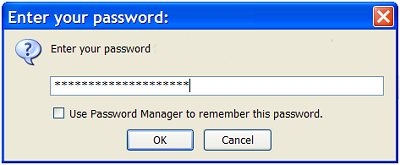
You should see something similar to this the next time you try to retrieve e-mail. If you wish to save the password so that you do not have to re-enter it again, just click the checkbox next to the label "Use Password Manager to remember this password."
Remember that is is not a good idea to save a password if the the PC is used by multiple people. If you accidentally save a password in this situation, just follow these instructions to remove the password from Thunderbird.
On Mozilla Thunderbird version 1.0.7-1.1.fc4 (20050929), there is no Tools->Options
function on the menu.
TE says
Hi David
I suggest you do an update to a current version. You are using an old version of Thunderbird that contains numerous vulnerabilities. The update is usually painless. 😀
I actually have a question that is a little different than this, but it is along the same lines. I would like to disable the password entirely when opening Thunderbird. I am the only person using the computer and nobody else has access. I have spent quite a bit of time trying to figure this out on my own, to no avail. Any assistance will be greatly appreciates.
TE says
Hi Linda
I assume you are talking about the password that’s requested when you retrieve your e-mail.
It’s easy to “disable” the password request. You need to have a password saved for each e-mail address so that Thunderbird can access your account. When you try to retrieve your e-mail a dialog box pops up that asks for a password. Just enter the password and check off the small checkbox that says, “Use Password manager to remember this password”. That stores your password and Thunderbird won’t ask for it again unless it fails to access your e-mail account.
If that doesn’t solve you issue, please give me more details.
I’m with you right up until step #4. There is no “View Saved Passwords” button in my rev of Thunderbird. I’m using version 2006 (20070728).
Stumped in San Francisco.
TE says
Doh! You found a typo. I changed number 4 to read, “Click the Edit Saved Passwords button”
Try it again. 😀
I have kind of the opposite problem… Thunderbird will NOT ask me for a password and I want it to! I need to enter the password to be able to access my mail, but after a new install of Thunderbird (latest version just downloaded) and entering all the account info, at no stage have I been asked for a password and I can’t find anywhere to enter one. There are no popup boxes of any kind, and nothing in the saved passwords area.
How can I force Thunderbird to ask me for my password?
TE says
The time to enter the password is when you attempt to retrieve your e-mail. The password request comes from the e-mail server. Thunderbird has the ability to store the password, but if Thunderbird never gets the password request, you will never see the password dialogue box.
It sounds like you are not connecting properly with the e-mail server. It could be due to a requirement to use an SSL port or a particular security setting. Read my articles about dealing with Thunderbird connection problems. That should resolve the issue.
Unfortunately, nothing shows up in the list when I click the “Edit saved passwords” button. See, I created a secondary E-mail account, but I cannot figure out the password. Anyone have any more ideas?
TE says
Hi Mr. X
Did you make sure that the Passwords Saved tab is selected on the Password Manager dialog box?
If you don’t see any passwords, then you have not saved any.
If you have forgotten your password, you will have to get it from your ISP or e-mail provider.
Hi,
I have different problem but in the same line….
In my Thunderbird , the check box saying “Use Password manager to remember this password” never appears in password window.
What will be the problem?
I was using version 2.0.0.4. Now I am using 2.0.0.9.But still the issue is there.
Thanks in advance…..
TE says
Hmmm. I looked for a flag in Thunderbird that might turn this message off, but didn’t find any.
Has anyone else seen this problem? Any solutions found?
Same as kitakagaya (I’m not asked for a password and it doesn’t show any mailbox://myaccount@pop.mail.provider.com in the password administrator). I’ve been once asked at first but I mistyped it and never asked again. The strange thing is that sending mail through the SMTP (with that particular account and where I typed the password correctly) works perfectly.
Is there another way to input a password in the pass admin other than being asked by the server? (entering manually a pass in there).
Th error message that I get is: in spanish: “Se produjo un error al enviar la contraseña. El servidor de correo pop.mail.provider.com respondió: Service temporarily unavailable”, I´ll try to translate it: An error ocurred sending the password. Server “x” sayd: service temporarily unavailable.
This server x doesnt use any secure conection (TLS, SSL, in this case NONE)
HELP!!
TE says
Hi Gabix
If you have saved passwords, they should display in the Password Manager. Try clicking on the Show Passwords button to see if anything displays. Also, make sure that the Passwords Saved tab is selected in the Password Manager. If they are not showing, it is possible that either Thunderbird is not finding the file or perhaps it is corrupted and it cannot read it. However it is strange that you can access the account where you entered the password correctly. That indicates that Thunderbird is reading the file.
Try clicking on the Remove All button in the Password Manager. That should force you to re-enter each password as you access each e-mail account the next time.
I don’t know of another way to input another password. That is what the Password Manager is supposed to handle.
Always make sure that you are using a current version of Thunderbird. There are a lot of bugs and security issues with older versions.
This didn’t work for me, still not getting prompted; monitoring the mail server, Thunderbird is just throwing the mail at it and not trying tho authenticate. Running 2.0.0.14. Same with 2.0.0.12. Luckily for me, I can modify the mail server but this isn’t a solution for mobile users. Guess I’m stuck with Outlook. Too bad.
I had saved passwords, but I wanted to change them. I did a “remove all” in the password manager. It shows that I have no passwords saved.
Now when I click on get mail for all accounts(some are via SSL or TLS), it seems Thunderbird is simply going to the server without prompting for a password. But no new mail shows up.
Strangely, when I send mail out from my gmail or road runner accounts, the outgoing mail does get sent. I thought they required a password at their smtp servers. What is going on here?
Something is broke here. Really broke.
Ok, additional searching yields this comment from here: http://forums.mozillazine.org/viewtopic.php?f=39&t=857265 …
If your servers settings are wrong (even a trailing space) then the server never is found and the password is never requested. This has to be it. Just wish I could figure out what part of my current settings is the trouble maker!
And the final answer is… new wireless router firewall is blocking outbound SSL on port 995. Finally!
TE says
Hi Joy
Good troubleshooting! Glad you found it.
There are dozens of variables that can affect both inbound and outbound messages and most of them have nothing to do with Thunderbird. Unfortunately, Thunderbird does not always give a clear indication as to why it is having problems and it usually gets the blame.
Thanks for following up with your solution. 😀
Ok, for me: I have passwords for both accounts that I have set up, I am asked for them when accessing email, yet under “Edit Saved Passwords”, “Password Manager’s Passwords Saved” tab no passwords are showing. What to do?
I removed passwords for both accounts and submitted a new password(the same) for both accounts. Now get a message that says “Sending of password did not succeed.Mail Server mail.comcast.net responded: invalid user name/password
)K
Doogie says
Hi George
The message says it all. The new usernames or passwords you submitted in Thunderbird do not match the passwords on your e-mail accounts. Thunderbird cannot change your e-mail account passwords. Make sure that you are using the exact same password in Thunderbird as the one assigned to your e-mail account. Upper and lower case does matter.
If you cannot get it to work right, call Comcast for assistance.
I can’t get Thunderbird to save my password. Hence, I can’t send email. I can only view emails.
Plesae help I’ve spend 20 hours on this in 2 weeks.
There are no saved passwords that show up in privacy sections. thanks
Doogie says
Hi DS
If your SMTP connection is not correct, Thunderbird will not save the password. In other words, you have to connect to your mail server in order for Thunderbird to save the password. Check your Outgoing Server configuration (SMTP). There is probably an error in there.
If that does not fix it, here are some other possible causes:
Thunderbird Password Not Remembered
I aggree with all postings on this site that mention the impossibility of sending mail through smpt. And I desaggree with all postings insisting that it is an ISP or computer problem. I have tried the following: I created a new mailbox (my provider allows me to create secondary mailboxes) and copied (with copy and paste, so without typos) all the information that I received as a reply into the definition of the new mailbox in Thunderbird. I have taken into account all the good advice found here and on other sites. I don’t think I have missed anything. So it’s not something that has changed either on my computer or at the provider. It is a brand new account created with state of the art form filling. However, when I try to send mail through this new mailbox, I get the sad old message, saying that the password has been refused, and inviting me to retype it. If I didn’t love T-bird for all its other qualities, I would have given up a long time ago, and switched to another mail client. What IS the matter with smtp functionality of Thunderbird?
Doogie says
Hi Jean-Pierre
It is all a matter of finding the right combination of settings. If one setting is incorrect, or something on your PC is blocking an outbound connection, or your ISP is refusing the connection for any reason, you will get the same generic error message that doesn’t really tell up anything useful. For that you can blame Thunderbird.
I’ve been using Thunderbird for several years and do run into intermittent problems with more than one ISP. From my experience, the ISP has been at fault for every intermittent problem. When I have problems getting the connection to work for a new account, it has always been something other than Thunderbird.
I wish I had an easy answer for the large number of people that do not seen to get it to work right.
Five days ago I was able to receive emails, but I wasn’t able to send. When I would try to send, I would get a request for a password, the system would not accept my password. My first session with ATT Tech was two days ago. We changed my password, changed incoming and outgoing settings from Bellsouth.net to att.yahoo.net and changed the port numbers. Yesterday I couldn’t access the internet at all. Today I went back to ATT Tech. We changed the password to a permanent one, and I got back on-line, but I still can’t send or receive emails, because when I’m prompted for the password, I get an “invalid password” response. ATT says it’s a Thunderbird problem.
Doogie says
Hi Carol
It’s not a Thunderbird problem. Thunderbird has nothing to do with your Internet access, which shows that the first AT&T tech screwed something up.
If the access information that the second AT&T tech gave you is correct, then something is likely misconfigured in your Thunderbird setup. The problem is that it is almost impossible to tell what is causing the problem, so you have to keep trying different things until you figure out the correct combination.
Thunderbird does not reject your password. The AT&T mail server you are trying to connect with rejects the password. It might not actually be a password issue, because the password will be rejected if SSL is not selected, or the SMTP server is not configured properly and selected, or anything else is not configured correctly. Make sure you go through all the issues in our articles about incoming e-mail problems, outgoing e-mail problems and SMTP configuration.
Right now I have zero faith in the AT&T techs. I just spent two hours on the phone with them earlier this week just trying to get some simple questions answered about their migration to a new system. They are telling customers to perform the migration themselves and have provided incorrect instructions, they are eliminating several features that I have been using, and then they are raising the cost by about 50%. I could not get an intelligent answer for even the simplest questions. The information they were giving me was clearly incorrect. Furthermore, they kept connecting me to different people who were equally inept.
I don’t mind it when companies move their tech support to India, but they should at least train their people properly. I’ve been using AT&T for personal e-mail and as a secondary Internet access for over 12 years. I will be canceling the service as soon as I finish moving all of my newsletter accounts to a Gmail address.
I’m running Windows 7 on my laptop and I just installed the latest Thunderbird e-mail software. What I’m noticing with this new version versus the one i have on my XP and Vista desktops is that it will not prompt for a password once it’s opened. It will only ask for a password if I were to click on the “get mail” button. The versions I have on the XP and Vista desktops immediately asks for password and once it’s entered, I will get a tone signifying that I have mail. I like the way that’s going on for me… I just don’t like the version in my Win 7 laptop wherein i have to click “get mail” and then password and automatically downloads new mail and after all is downloaded, the tone goes off. Shouldn’t it be the other way around?
Just changed my internet connection password due to problems connecting to internet [with ATT]. Now I can’t send outbound email. Still receiving inbound email. How do I update my password for outgoing SMTP? I tried all the above methods [options>privacy, etc} Very frustrating. Thanks.
Figured it out. I had to restart Thunderbird. Thanks!
I was having the problem where Thunderbird wouldn’t connect. I deleted the passwords. It wouldn’t prompt for new ones. It was an IMAP account, so I deleted the account information and made a new one. It prompted, and all my local folders were still intact.
The problem may be in your Thunderbird security options. If you get a request for a password when trying to send an email and Thunderbird won’t accept it even when it is the correct password, try the following:
Tools - Go to Account Settings
Select the Outgoing Server at the bottom of the left hand panel
Click on your account name
Select Edit
Change Connect Security to “None”
Change Authentication to “No authentication”.
This should ensure that Thunderbird does not ask you for a password to send email.
If you have the same problem with incoming emails, try the above procedure using the Server Settings immediately under your account name.
Can we set a password for Thunderbird other than the password for individual email account so that nobody can open my emails from Thunderbird unless that local password is provided.
Conrad says
Hi suraku
Thunderbird does not have a master password that will prevent others from accessing e-mail that is already downloaded, but it does have a master password to prevent others from downloading your messages.
http://kb.mozillazine.org/Master_password
On a side note I am using 3.1.4. And I know this sounds nuts so forgive me. I seem to only be able to chage the PassWord by actualy going in and removing the saved password and restarting the program.
On my program , I am not seeing an edit PW option under saved passwords (I can view them) or under accounts.
I suspect its me as a password is one of the most common things in email so can someone clarify where the setting is I missed?
Conrad says
Hi JD
I’m currently using 3.1.4. The article was written for the 2.x version. Some things changed on 3.x. It looks like you do have to delete a password and then re-enter it when you access the e-mail.
Tools > Options > Security (tab) > Passwords (tab)
Saved passwords (button), then select the e-mail account and click the Remove button to delete the password. Then re-start Thunderbird.
You have it correct.
I have a question. I am using XP PRO and Thunderbird 3.1.7. For some reason Thunderbird does not ask for a password either when I’m receiving or sending my email but I want it to. I have looked and looked and cannot find anything on the internet that addresses this problem. May I ask how you do it? Thanks very much!
Doogie says
Hi Chuck
Once you check the box when Thunderbird asks if you want to save the password, it is stored. You do not have to enter it again. You must have done that, because you cannot access e-mail from a mail server without a password-unless the server has a major security problem.
This an old article. The instructions changed slightly for Thunderbird 3.x. They have now been updated. If you want to use a password, follow the instructions in the article above to delete the existing passwords.
Hi! I tried what jonathan said i.e, clicking remove button but its d same, the TB will only asks password when your about to read the email. I have the same prob with Ruuudyc.
after changing my password but when trying to retrieve am getting this error “Sending of password did not succeed. Mail server mail.ecs.co.ke responded: maildrop already locked”
Doogie says
Hi Kenyz
I have never seen that message, but it looks like there is something wrong with your mailserver or your password. Contact your ISP or whoever runs the mailserver.
Don’t forget that when you change a password you have to change it on both the mailserver and in Thunderbird.
I can’t send emails. It keeps asking for my password, no matter how often I enter it I keep getting asked for the password. I have downloaded the newest version, I have removed and reentered my password …. I still can send emails.
Doogie says
Hi Jean
Either your username or the password is wrong or the SMTP server is not configured correctly in Thunderbird. Check with tech support at your hosting company to make sure that you have the correct info. Also, check out this article: Thunderbird Outgoing Email Problems – SMTP Configuration Scenarios.
If you are trying to change your e-mail password, you need to change it in your e-mail account before you change it in Thunderbird. Thunderbird will not change the password in your e-mail account.
Help. I set up a master password for Thunderbird on my Mac, kind of on a whim, and I can’t remember it. (Multi-tasking, neglected to write down password). I have researched this and tried deleting the Key3 file under profiles - the file is gone - but I still get asked for the “security device” (password). The program won’t open and I can’t seem to get in to reset. Anyone know this one?
When I want to set my changed passwort in Thunderbird 2.0 in the password-manager, it isn’t possible to delete. Clicking the delete-button doesn’t work and right mouseclick also wouldn’t help. How can I delete the old password to set up the new one?
Doogie says
Hi Pollux
Did you highlight the account related to the password that you want to delete, as the instructions state? If you don’t highlight an account, the button stays grayed-out.
If that doesn’t work, try upgrading Thunderbird. There were some strange problems with older versions.
Thunderbird is currently at version 10.
Now on v. 13 of TB and still cannot get pw accepted. Will try removing security. Am now ready to abandon TB for Gmail.
musicmamo says
i have somehow disabled my ability to send email on this account. i am using eudora on my computer as opposed to webmail. we have the same problem with thunderbird using a different address. this is getting old. help, please!
This is Crazy!!! after upgrading to ver. 14 I can not accept or send new mail… error says that authentification is failure… because the passwords are missing and can not add them or remove somehow… I am not moving anywhere … F*** It !!! No solution … create new account?>>> S***!